Import namespace
By importing namespaces under a project, you can flexibly manage Kubernetes namespaces under any cluster on the platform. When used with the Remove Namespace function, you can reset the relationship between namespaces and projects.
Importing a project’s namespace provides you with the same services as creating a namespace on the platform.
Caution: A namespace belongs to only one project and cannot be imported to another project if it already belongs to one.
Usage scenarios
The common usage scenarios are as follows:
-
When a new cluster is added to the platform, you can import existing Kubernetes namespaces under the cluster to the project on the platform for management one by one using the namespace import function. The operation process is shown in the following figure.
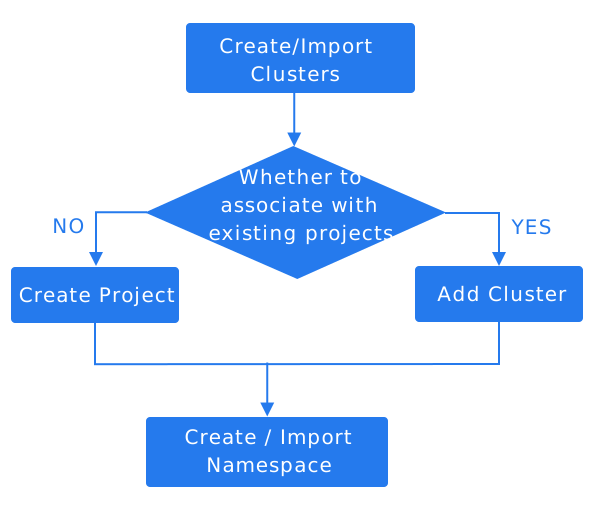
Reference: Create a project , Add a cluster to a project .
-
If a namespace has been removed from a project, you can import it to another project for management using the namespace import function.
-
If a namespace that is not associated with any project on the platform has been created for a cluster in another way (for example, by using a script on the cluster), you need to import it to a specific project using the namespace import function to view and manage it on the platform.
Prerequisites
-
The namespace does not belong to any project on the platform.
-
You can only import a namespace to a project that is associated with a Cluster. If there is no project associated with a Cluster on the platform, you need to create a project that meets this condition first.
Procedure
-
In the Project Management view, click on the Project name where the namespace to be imported is located.
-
In the left navigation bar, click on Namespaces > Namespaces.
-
Click on the Import Namespace button to the right of the create namespace button, represented by
 .
. -
Refer to the parameter description in Creating a Namespace to configure the relevant parameters.
-
Click on Import.