Create a load balancer
Load Balancer is a service that distributes traffic to container instances. By using load balancing, traffic to workloads is automatically allocated and forwarded to container instances. Load balancing can improve the fault tolerance of workloads, scale the external service capabilities of workloads, and enhance the availability of applications.
Platform administrators can create single-point or highly available load balancers for any cluster on the platform, and centrally manage and allocate load balancer resources. For example, they can assign load balancers to projects and control that only users with the corresponding project permissions can use the load balancer.
Please refer to the following table for explanations of the relevant concepts in this section:
| Parameter | Description |
|---|---|
| Load balancers | Load balancers are software or hardware devices that distribute network requests to available nodes in a cluster. The load balancer used in the platform is a Layer 7 software load balancer. |
| VIP | Virtual IP address (Virtual IP Address) is an IP address that is not associated with a specific computer or specific computer network card. When the load balancer is of high availability type, the access address should be the VIP. |
Prerequisites
The high availability of Load balancers requires VIP, which can be obtained in the following two ways.
Use LoadBalancer Type Service to Provide VIP
When creating a load balancer, enable the Internal Routing option. The system will automatically create an internal routing of type LoadBalancer to provide a VIP for the load balancer. Before using it, make sure that the current cluster supports internal routing of type LoadBalancer. You can use the built-in LoadBalancer internal routing provided by the platform. For specific configurations, please refer to External Address Pool . If the Internal Routing option is disabled, you need to configure an access address for the load balancer.
External Load Balancer Device Provides VIP
-
Please coordinate with the network engineer in advance to determine the IP address (public IP, private IP, VIP) or domain name for deploying the load balancer service. If you want to use a domain name as the address for external traffic to access the load balancer, you need to apply for the domain name in advance and configure domain name resolution. It is recommended to use a commercial load balancer to provide a VIP. If not available, you can use the pure software data center LB solution (Alpha) .
-
Depending on the business scenario, external load balancers need to configure health checks for all ports in use to reduce downtime during ALB upgrades. The health check configuration is as follows:
Health Check Parameter Description Port - For global, fill in: 11782.
- For cluster, fill in: 1936.
Protocol The protocol type for health check, TCP is recommended. Response Timeout The time to wait for a response for health check, it is recommended to configure it as 2 seconds. Check Interval The time interval for health check, it is recommended to configure it as 5 seconds. Unhealthy Threshold The number of consecutive failures after which the health check status of the backend server is determined as failed, it is recommended to configure it as 3 times.
Create a load balancer
-
In the left navigation pane, click Networking > Load balancers.
-
Click on Create a load balancer.
-
Refer to the following instructions to complete the network configuration.
Parameter Description Network Mode - Host Network Mode: Only one load balancer replica is allowed to be deployed on a single node, and multiple businesses share one ALB, which has better network performance.
- Container Network Mode: Multiple load balancer replicas can be deployed on a single node to meet the needs of each business using ALB separately, but the network performance is slightly worse.
Internal Routing and Annotations (Alpha) - Internal Routing: When enabled, it will create a LoadBalancer type internal routing to provide an access address for the load balancer. Before using it, make sure that the current cluster supports LoadBalancer type internal routing. You can use the platform’s built-in LoadBalancer internal routing implementation. For specific configurations, please refer to External Address Pool ; When disabled, you need to configure the access address for the load balancer.
- Annotations: Used to declare the configuration or capability of LoadBalancer type internal routing, For specific details, please refer to the LoadBalancer Type Service Annotation Instructions .
Access Address The access address of the load balancer, which is the service address of the load balancer instance. After the load balancer is successfully created, it can be accessed through this address. - In host network mode, please fill in according to the actual situation, it can be a domain name or IP address (intranet IP, public IP, VIP).
- In container network mode, it will be automatically obtained.
-
Refer to the following instructions to complete the resource configuration.
Parameter Description Specification Please set the specification reasonably according to business needs. You can also refer to Load Balancer Selection and Planning for reference. Deployment Type - Single Node: The Pods of the load balancer are deployed on a single node. If a machine failure occurs, it may cause the load balancer to be unavailable.
- High Availability: Multiple Pods of the load balancer are deployed on the corresponding number of nodes, usually 3. It meets the load balancing requirements of large business volumes and has emergency disaster recovery capabilities.
Replica Count The number of Pods for the load balancer.
Note: To ensure high availability of the load balancer, it is recommended to have a replica count of at least 3.Node Labels Filter nodes by labels for deploying the load balancer.
Note:- It is recommended that the number of nodes that meet the requirements is greater than the replica count of the load balancer.
- For labels with the same key, only one can be selected (if multiple are selected, there will be no host that meets the conditions).
Resource Allocation Mode - Instance: The load balancer instance can listen on any port in the range of 1-65535 and can be used by projects.
- Port (Alpha): Only ports within the specified range can be allocated to projects. When port resources are limited, this mode can meet more granular resource control.
Allocation Project - When the Resource Allocation Mode is Instance, the load balancer is allocated to all projects associated with the current cluster or to the specified projects. In the allocated projects, Pods in all namespaces can receive requests distributed by the load balancer.
- All Projects: Allocate the load balancer to all projects associated with the current cluster.
- Specified Projects (Alpha): Click the drop-down selection box under Specified Projects, click the checkbox on the left side of the project name, select one or more projects, and allocate the load balancer to the specified projects.
Note: You can enter the project name in the drop-down box to perform fuzzy search for projects. - Not Allocated (Alpha): Do not allocate projects temporarily. After the load balancer is created, you can update the allocation project parameters of the created load balancer through the Update the project operation.
- When the Resource Allocation Mode is Port, this item does not need to be configured. After creating the load balancer, manually allocate the port information, refer to Assigning Ports .
-
Click Create. The creation process will take some time, please be patient.
Relevant operations
Update the Load Balancer
Note: Updating the load balancer will cause a 3 to 5 minute service interruption. Please choose an appropriate time to perform the operation!
Procedure of operation
-
In the left navigation pane, click Networking > Load balancers.
-
Click on
 > Update.
 -
Update network and resource configurations on demand.
-
Please set the specifications reasonably according to business needs. You can also refer to the Load Balancer Selection and Planning for reference.
-
Internal routing only supports updating from disabled state to enabled state.
-
-
Click Update.
Remove load balancer
Note: After deleting the load balancer, the associated ports and rules will also be deleted and cannot be recovered.
Procedure of operation
-
Start by preparing the necessary resources and tools for the operation.
-
Ensure that all the required software and hardware components are in place and functioning properly.
-
Begin by setting up the Kubernetes cluster. This involves installing and configuring the necessary software, such as the Kubernetes control plane and worker nodes.
-
Once the cluster is set up, deploy the desired applications and services onto the cluster. This can be done using Kubernetes manifests or Helm charts.
-
Monitor the cluster and applications to ensure they are running smoothly. Use tools like Prometheus and Grafana to gather metrics and visualize the cluster’s health.
-
Perform regular maintenance tasks, such as upgrading Kubernetes versions, applying security patches, and scaling the cluster as needed.
-
Troubleshoot any issues that arise during operation. This may involve analyzing logs, debugging applications, or adjusting configurations.
-
Continuously monitor and optimize the cluster’s performance and resource utilization. This can involve adjusting resource requests and limits, optimizing networking, and implementing autoscaling.
-
Regularly backup and restore the cluster’s data to ensure data integrity and availability.
-
Stay up to date with the latest developments in the Kubernetes and cloud-native industry. Attend conferences, read blogs, and participate in the community to stay informed and improve your skills.
-
Document all the steps and processes involved in the operation for future reference and knowledge sharing.
-
In the left navigation pane, click Networking > Load balancers.
-
Click on
> Delete, and confirm.
Load balancer selection and planning
For the resource allocation of instances and ports in the production environment specifications of small, medium, large, and custom sizes defined by the platform, the following suggestions can be used as a reference for deployment.
Smaller production environments
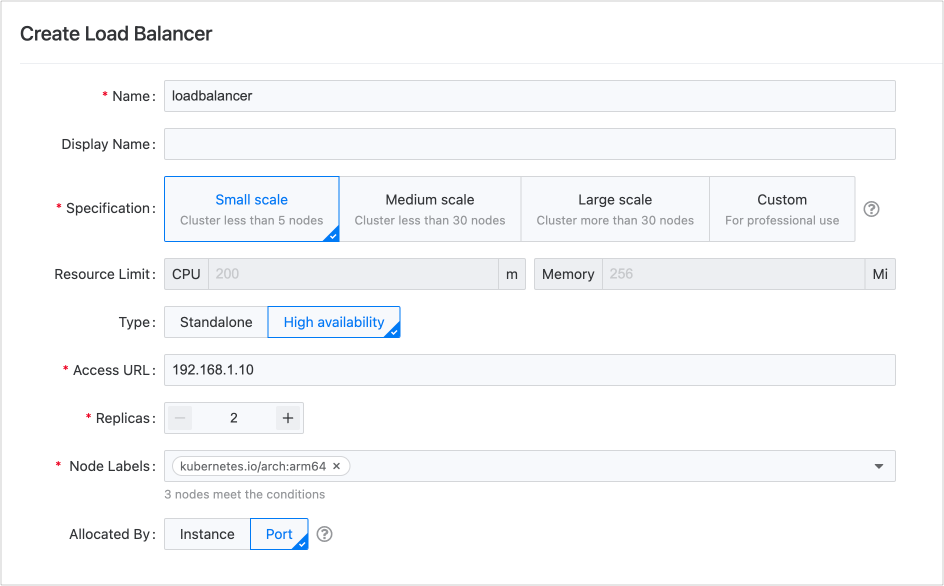
If the business scale is small, for example, the number of nodes in the cluster does not exceed 5, and it is only used to run regular applications, a single load balancer is sufficient. It is recommended to use the High Availability mode with at least 2 replicas to ensure environment stability.
You can provide a load balancer to multiple projects through port isolation.
The peak QPS of this specification, measured in a laboratory environment, is approximately 300 times per second.
Medium-sized production environments
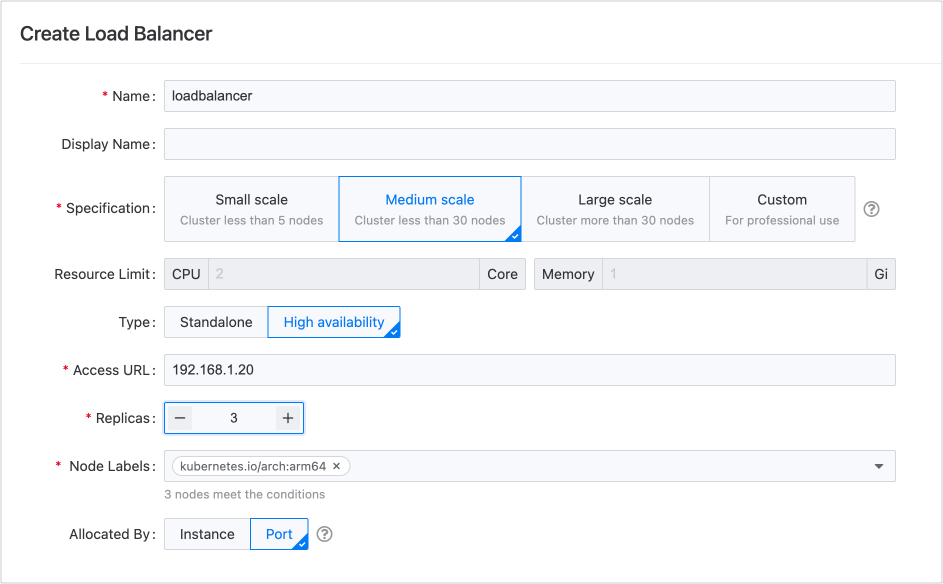
When the business volume reaches a certain scale, for example, when the number of nodes in the cluster does not exceed 30, in addition to running regular applications, it is also necessary to handle high-concurrency businesses. Using a single load balancer is sufficient. It is recommended to adopt a High Availability mode with at least 3 replicas to ensure environment stability.
You can provide load balancers to multiple projects through port isolation or instance allocation. Of course, you can also create a load balancer exclusively for the core project.
The peak QPS of this specification, measured in a laboratory environment, is approximately 10,000 times per second.
Large production environments
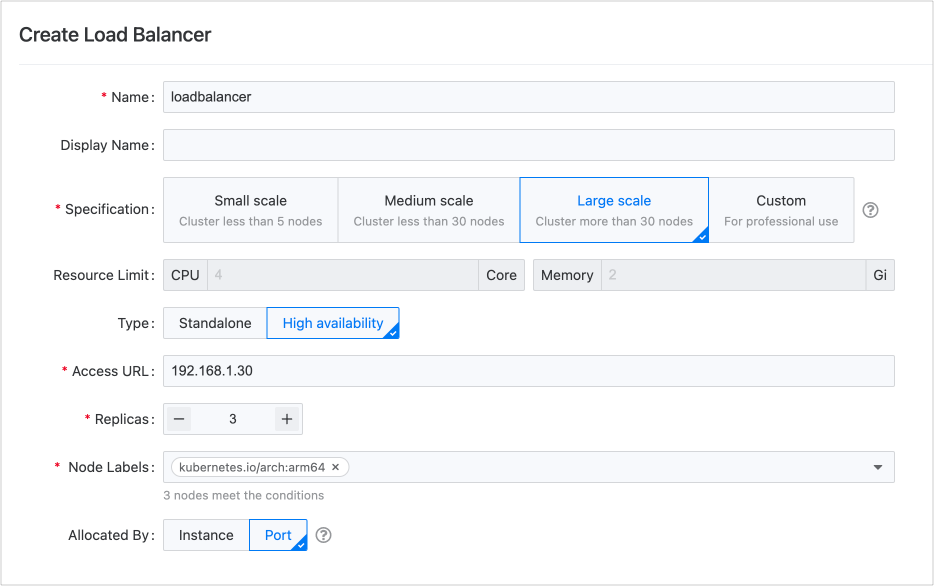
When the scale of business is large, for example, the cluster contains more than 30 nodes, and in addition to running regular applications, it is also necessary to handle high-concurrency business and even handle long-link data, it is recommended to use multiple load balancers, and each load balancer belongs to the High Availability type with at least 3 replicas to ensure environment stability.
You can provide load balancers to multiple projects through port isolation or instance allocation. Of course, you can also create a load balancer exclusively for the core project.
The peak QPS of this specification measured in a laboratory environment is approximately 20,000 times per second.
Special scenario deployment recommendations
| Scenario | Deployment Recommendation |
|---|---|
| Function Trial | It is recommended to deploy a single instance load balancer. |
| Test Environment | If the test environment meets the definition of small or medium, use a single point load balancer. The load balancer instance can be shared among multiple projects. |
| Core Application | It is recommended to use a dedicated load balancer for the core application. |
| Large-scale Data Transfer | Due to the minimal memory consumption caused by the load balancer itself, even for large specifications, reserving 2Gi of memory is sufficient. However, if the business requires large-scale data transfer, which will result in a large amount of memory consumption, it is recommended to increase the memory specification of the load balancer. It is recommended to gradually expand the memory of the load balancer in the custom specification scenario. By closely monitoring the memory usage of the load balancer, the appropriate memory size can be obtained to achieve a reasonable memory utilization rate. |
Load Balancer Usage Selection
| Usage | Advantages | Disadvantages |
|---|---|---|
| (Recommended) Load balancer is allocated to a single project based on instance resource allocation |
|
In the case of host network mode, the cluster needs a large number of nodes for load balancer usage, which requires high resource consumption. |
| Load balancer is allocated to multiple projects based on instance resource allocation | Simple management. | Since the allocated projects have all the permissions of this load balancer instance, the following situations may occur:
|
| Load balancer is allocated based on port resource allocation, with different projects using different ports | The rules between projects are isolated and do not affect each other. |
LoadBalancer Type Service Annotation Instructions
AWS EKS Cluster
For detailed information on AWS EKS LoadBalancer-type internal route annotations, please refer to the Annotation Usage Documentation .
| Key | Value | Description |
|---|---|---|
| service.beta.kubernetes.io/aws-load-balancer-type | external: Use the official AWS LoadBalancer Controller. | Specify the LoadBalancer type internal route controller to be used. Note: Please contact the platform administrator to deploy the AWS LoadBalancer Controller in advance. |
| service.beta.kubernetes.io/aws-load-balancer-nlb-target-type |
|
Specify how traffic is sent to container groups. |
| service.beta.kubernetes.io/aws-load-balancer-scheme |
|
Specify whether to use intranet or internet. |
| service.beta.kubernetes.io/aws-load-balancer-ip-address-type |
|
Specify the supported IP protocol stack. |
Huawei Cloud CCE Cluster
For detailed information on CCE LoadBalancer-type internal route annotations, please refer to the Annotation Usage Documentation .
| Key | Value | Description |
|---|---|---|
| kubernetes.io/elb.id | Fill in the ID of the cloud load balancer, which must use an existing cloud load balancer. | |
| kubernetes.io/elb.autocreate | Example: {“type”:“public”,“bandwidth_name”:“cce-bandwidth-1551163379627”,“bandwidth_chargemode”:“bandwidth”,“bandwidth_size”:5,“bandwidth_sharetype”:“PER”,“eip_type”:“5_bgp”,“available_zone”:[“cn-north-4b”],“l4_flavor_name”:“L4_flavor.elb.s1.small”} Note: Please read the instructions and adjust the example parameters as needed. |
Create a new cloud load balancer. |
| kubernetes.io/elb.subnet-id | The ID of the subnet in which the cluster is located must be filled in when the Kubernetes version is 1.11.7-r0 and below, and a new cloud load balancer is being created. | |
| kubernetes.io/elb.class |
|
Specify the type of cloud load balancer to be created. Please refer to [the difference between dedicated and shared elastic load balancing](https:// |
support.huaweicloud.com/intl/zh-cn/productdesc-elb/elb_pro_0004.html) for details. | | kubernetes.io/elb.enterpriseID | | Specify the enterprise project to which the new cloud load balancer belongs. |
Azure AKS Cluster
For detailed information on AKS LoadBalancer-type internal route annotations, please refer to the Annotation Usage Documentation .
| Key | Value | Description |
|---|---|---|
| service.beta.kubernetes.io/azure-load-balancer-internal |
|
Specify whether to use intranet or internet. |
Google GKE Cluster
For detailed information on GKE LoadBalancer-type internal route annotations, please refer to the Annotation Usage Documentation .
| Key | Value | Description |
|---|---|---|
| networking.gke.io/load-balancer-type | Internal | Specify the use of intranet. |
| cloud.google.com/l4-rbs | enabled | Default is public. If this parameter is configured, traffic will be routed directly to the container group. |