How do I select a runtime component?
Container Runtime is one of the core components of Kubernetes, responsible for managing images and the lifecycle of containers.
When creating a cluster through the platform, you can choose Containerd or Docker as the container runtime component.
Tip: Starting from Kubernetes 1.24, Docker runtime is no longer officially supported. It is recommended to use Containerd as the runtime. If you still need to use Docker runtime, please contact the administrator to enable this feature.
Note: Due to component dependencies and platform architecture considerations, the correspondence between supported Kubernetes versions and types/versions of container runtime components for self-built clusters on the platform can be found in Cluster Component Version Requirements . This document only discusses the differences between Containerd and Docker for your reference.
Quick Type Selection
| Choose Containerd | Choose Docker |
|---|---|
| Shorter call chain, fewer components, more stable, less node resource consumption | Docker in Docker support; Ability to use docker build/push/save/load commands on nodes;Access to Docker API; Support for Docker Compose or Docker Swarm. |
Docker and Containerd components are different
Component common commands
| Containerd | Docker | Description |
|---|---|---|
| crictl ps | docker ps | View running containers |
| crictl inspect | docker inspect | View container details |
| crictl logs | docker logs | View container logs |
| crictl exec | docker exec | Execute commands inside a container |
| crictl attach | docker attach | Attach to a running container |
| crictl stats | docker stats | Display container resource usage |
| crictl create | docker create | Create a container |
| crictl start | docker start | Start a container |
| crictl stop | docker stop | Stop a container |
| crictl rm | docker rm | Remove a container |
| crictl images | docker images | View the list of images |
| crictl pull | docker pull | Pull images |
| N/A | docker push | Push images |
| crictl rmi | docker rmi | Remove images |
| crictl pods | N/A | View the list of pods |
| crictl inspectp | N/A | View pod details |
| crictl runp | N/A | Start a pod |
| crictl stopp | docker images | View images |
| ctr images ls | N/A | Stop a pod |
| crictl stopp | docker load/save | Import/export images |
| ctr images import/exporter | N/A | Stop a pod |
| ctr images pull/push | docker pull/push | Pull/push images |
| ctr images tag | docker tag | Tag images |
Call Chain Distinction
-
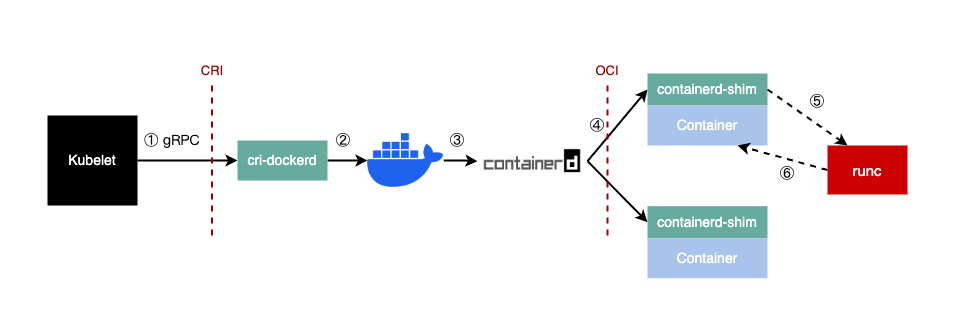
For Docker as the Kubernetes container runtime, the call chain is as follows:
kubelet > cri-dockerd > dockerd > containerd > runC
-
For Containerd as the Kubernetes container runtime, the call chain is as follows:
kubelet > CRI plugin (within the containerd process) > containerd > runC

Summary: While dockerd adds functionality such as swarm cluster, docker build, and docker API, it may introduce some bugs and an additional layer of calls compared to containerd. Containerd has a shorter call chain, fewer components, more stability, and consumes fewer node resources.
Log and Related Parameters Comparison
| Comparison Item | Docker | Containerd |
|---|---|---|
| Storage Path | If Docker is used as the Kubernetes container runtime, container logs are stored by Docker in directories like /var/lib/docker/containers/$CONTAINERID. Kubelet creates symlinks in /var/log/pods and /var/log/containers pointing to the log files in /var/lib/docker/containers/$CONTAINERID. |
If Containerd is used as the Kubernetes container runtime, Kubelet handles the storage of container logs in the directory /var/log/pods/$CONTAINER_NAME and creates symlinks in /var/log/containers pointing to the log files. |
| Configuration Parameters | In Docker configuration file: "log-driver": "json-file", "log-opts": {"max-size": "100m","max-file": "5"} |
* Method 1: Specify in kubelet parameters: --container-log-max-files=5 --container-log-max-size="100Mi"* Method 2: Specify in KubeletConfiguration: "containerLogMaxSize": "100Mi" "containerLogMaxFiles": 5 |
| Saving Container Logs to Data Disk | Mount the data disk to the “data-root” (default is /var/lib/docker). |
Create a symlink /var/log/pods pointing to a directory on the data disk mount point. |
CNI Network Comparison
| Comparison Item | Docker | Containerd |
|---|---|---|
| Who Calls CNI | cri-dockerd | Built-in cri-plugin in Containerd (after containerd 1.1) |
| How to Configure CNI | cri-dockerd parameters --cni-conf-dir, --cni-bin-dir, --cni-cache-dir |
Containerd configuration file (toml): [plugins.cri.cni] bin_dir = "/opt/cni/bin" conf_dir = "/etc/cni/net.d" |