*Create a local user
Requests
HTTP request
POST /auth/v1/users
Create users
Request body
Content-Type
application/json
Sample request
Create UserBody
{
   "apiVersion": "auth.alauda.io/v1",
   "kind": "User",
   "metadata": {
     "name": "1e9eea56686511e9052e6578b56ae018"
   },
   "spec": {
     "email": "example4",
     "expired": {
       "begin": "2021-06-30T09:26:44Z",
       "end": "2021-07-15T09:26:44Z"
     },
     "groups": [
       "ungrouped"
     ],
     "mail": "example4@example.com",
     "password": "a7LE41gAspuxWmkLgoVq1tlh8uIhEHStbPyB4OMtRmUwCzJULCoSYbM/VlwVoc9GlsaONqDQfKvQNsUYifElNaUJXvufDUEL7uUb8F/igl+adxafwZHeOYtZfBF/AeoP4M5Tjc3xSL+rD03iNjVSCsEvm9wK76JlPnvt8lkv5UTwzuwke0IrBQOFcqUFJVY7woY45TUN6P0YqO6pb3mb+IVoKUjlJEXX0hXBbbpNtkQLaqPVqMkTWDOGCJ4MSj+MFUAKXzOv0nk6fao48aXpps4STrRU5hSW8vfMKMBlP8DIFoCi7C5Ga+Pfpx4DRN+jrRdMF/X0Mu73V3vuTZURew==",
     "username": "example4"
   }
 }
Parmeters
| Name | Type | Required | Description |
|---|---|---|---|
| apiVersion | string | True | See common parameters |
| kind | string | True | See common parameters |
| spec | object | True |
Create UserBody Spec
Path: spec |
| spec.email | string | True |
email
Path: spec.email |
| spec.expired | object | True |
set expired time
Path: spec.expired |
| expired.begin | string | True |
begin time
Path: spec.expired.begin |
| expired.end | string | True |
end time
Path: spec.expired.end |
| spec.groups | array | True |
groups
Path: spec.groups |
| spec.groups[] | string | True |
group
Path: spec.groups[] |
| spec.password | string | True |
password
Path: spec.password |
| spec.username | string | True |
username
Path: spec.username |
Responses
Content-Type
application/json
Status code: 201
OK
Sample response
user definition
{
   "metadata": {
     "annotations": {
       "cpaas.io/creator": "admin@cpaas.io",
       "cpaas.io/display-name": "example4",
       "cpaas.io/updated-at": "2021-06-30T09:25:45Z"
     },
     "creationTimestamp": "2021-06-30T09:25:45Z",
     "generation": 1,
     "labels": {
       "auth.cpaas.io/user.connector_id": "local",
       "auth.cpaas.io/user.connector_type": "local",
       "auth.cpaas.io/user.email": "1e9eea56686511e9052e6578b56ae018",
       "auth.cpaas.io/user.state": "disabled",
       "auth.cpaas.io/user.username": "",
       "auth.cpaas.io/user.valid": "true"
     },
     "name": "1e9eea56686511e9052e6578b56ae018",
     "resourceVersion": "10648655",
     "selfLink": "/apis/auth.alauda.io/v1/users/1e9eea56686511e9052e6578b56ae018",
     "uid": "88fb58bc-d304-486a-832b-571a44f7b7c7"
   },
   "spec": {
     "connector_name": "local",
     "connector_type": "local",
     "email": "example4",
     "expired": {
       "begin": "2021-06-30T09:26:44Z",
       "end": "2021-07-15T09:26:44Z"
     },
     "groups": [
       "ungrouped"
     ],
     "is_admin": false,
     "is_disabled": true,
     "mail": "example4@example.com",
     "state": "active",
     "username": "example4",
     "valid": true
   }
 }
Parameters
| Name | Type | Description |
|---|---|---|
| metadata | object | See common parameters |
| spec | object |
user spec
Path: spec |
| spec.connector_name | string |
connector name
Path: spec.connector_name |
| spec.connector_type | string |
connector type
Path: spec.connector_type |
| spec.email | string |
email
Path: spec.email |
| spec.expired | object |
set expired time
Path: spec.expired |
| expired.begin | string |
begin time
Path: spec.expired.begin |
| expired.end | string |
end time
Path: spec.expired.end |
| spec.groups | array |
groups
Path: spec.groups |
| spec.groups[] | string |
group
Path: spec.groups[] |
| spec.is_admin | boolean |
check user is admin or not
Path: spec.is_admin |
| spec.username | string |
username
Path: spec.username |
| spec.valid | boolean |
describe user is valid or not
Path: spec.valid |
Other status codes
How to encrypt plaintext passwords using RSA?
When calling the current interface to create a user, the Password in the request body needs to be RSA encrypted. Below you will find instructions on how to encrypt a plaintext password.
Procedure
-
Call the
GET /auth/v1/pubkeyinterface to get the encrypted public key.The following is an example of the return body:
{
 "ts": "1663054013",
 "pubkey": "-----BEGIN PUBLIC KEY-----\nMIIBIjANBgkqhkiG9w0BAQEFAAOCAQ8AMIIBCgKCAQEAwVgAcD7VRGxxdsaKK+IX\ntyWEufi4D5d7810WAjhEt3+JtvBFfodbYz/198XJEWMLtestxxxxxVyD\nNSfPZaCc1OOb9tqm9p4cjMM/xjgc87YPMjH4rUKvI7N/zfhHPArcq2PUwqZTh072\nhQIDAQAB\n-----END PUBLIC KEY-----\n",
 "pubkey_encode": "LS0tLS1CRUdJTiBQVUJMSUMgS0VZLS0tLS0KTUlJQklqQU5CZ2txaGtpRzl3MEJBUUVGQUFPQ0FROEFNSUlCQ2dLQ0FRRUF3VmdBY0Q3VlJHeHhkc2FLSytJWAp0eVdFdWZpNEQ1ZDc4MTBXQWpoRXQzK0p0dkJGZm9kYll6testxxxxxxFVCTElDIEtFWS0tLS0tCg=="
}
Parameter Description:
-
pubkey: RSA public key.
-
ts: the time to get pubkey, in Unix timestamp format.
-
pubkey_encode: the Base64 encoded string of the pubkey. 2.
-
-
Execute the following command line in the terminal to get the Base64 decoded pubkey.
echo "<pubkey_encode>" | base64 -d -
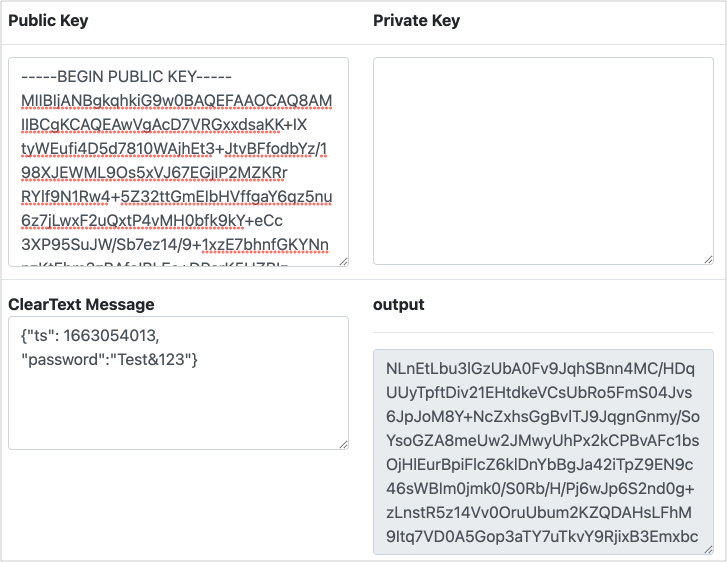
Use the RSA encryption tool to encrypt the plaintext password and obtain the encrypted password, referring to the following instructions.
-
Parameter Description:
-
Public Key: Enter the pubkey after Base64 decoding.
-
ClearText Message: clear text message, input format:
{"ts": <timestamp when getting pubkey>, "password":"<plaintext password>"}, for example:{"ts": 1663054013, "password": "Test&123"}. -
output: RSA encrypted password.
-