Create a storage cluster
Whether it is the initial deployment or resource scaling, you need to map the available disks on the nodes to be used and managed as storage devices.
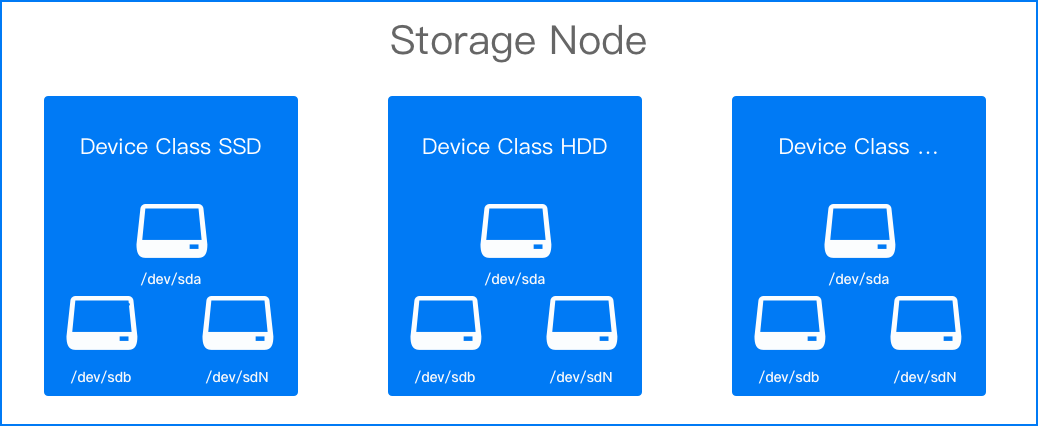
Storage devices with the same features are usually used together and are classified as device classes in local storage. Using device classes is no different from using disks directly, as it still ensures zero loss and high performance, while also reducing the application’s awareness and dependency on specific devices.
Prerequisites
-
At least one device class (deviceClasses.classes) needs to be added when creating a local storage cluster, and the device class should include devices.
-
There is at least one bare disk on the node.
Recommended hardware configurations for distributed storage
-
In the left navigation bar, click Storage > Distributed storage.
-
On the Details tab, click Add Storage Node.
-
Refer to the following instructions to configure the relevant parameters.
Parameter Description Storage Node A node that has at least 1 bare disk. Device Class Each device class corresponds to a group of storage devices with the same characteristics. It is recommended to fill in the name based on the disk properties, such as hdd or ssd. Storage Device For example, /dev/sda. If there are multiple disks, they can be added one by one.
Note: The storage device should be the entire hard disk and not a partition on the hard disk, otherwise an error will occur. -
Click Add.
Note: If the device class status is “Unavailable” due to the device not being added yet, continue with the following steps.
-
Switch to the Storage Devices tab and click Add Storage Device.
-
Add devices according to the prompts on the interface.
-
Click Add.