logo
Alauda DevOps Pipelines Docs
logo
Alauda DevOps Pipelines Docs
Navigation

Overview

Introduction
Architecture
Feature Overview
Quick Start
Lifecycle Policy
Release Notes

Concepts

TektonConfig
TektonPipeline
Install

Upgrade

Upgrade Path
Upgrade Alauda DevOps Pipelines Operator

Configure

Adjusting Optional Configuration Items of Subcomponents
Configuring Resource Quotas for Pipeline Components
Pod Template Configuration Guide
Regular Cleanup of TaskRun and PipelineRun Resources

How To

Deploying tekton-pipelines in a global cluster through TektonConfig

Pipelines

Introduction
Architecture

Concepts

Tasks
TaskRuns
Pipelines
PipelineRuns
StepActions
Resolvers
Workspaces
Pod Templates
Quick Start

How To

Adjust Dockerfile for Building Task-Compatible Custom Images
Specifying remote pipelines using hub resolvers
Specifying remote tasks using hub resolvers
Use java-image-build-scan-deploy Pipeline

Trouble Shooting

Failed to create pod due to config error when using custom images in Tekton
Permission Issues When Using Custom Images in run-script Task
Unable to Use Multiple PVC Workspaces in Tekton
permissions

Triggers

Introduction
Architecture

Core Concepts

Core Concepts
EventListener
Trigger
Interceptor
TriggerBinding
TriggerTemplate
Quick Start

How To

Setup EventListener
Use GitLab Event Triggers
Create TriggerTemplate

Troubleshooting

The Pipeline is not automatically triggered
Permission Description

Hub

Introduction
Architecture

Core Concepts

Concepts
Understanding Tekton Hub
Permission Description

Results

Introduction
Architecture

Concepts

Core Concepts
Tekton Results
Quick Start
permissions

Configure

Database Configuration

Supply Chain Security

Introduction
Architecture

Concepts

Core Concepts
Understanding Tekton Chains

Quick Start

Getting Started
Signed Provenance

How To

Image Signature Verification
Build System Provenance Verification
Source Code Repository Verification
Vulnerability Scanning and Verification
Base Image and SBOM Verification
License Compliance Verification
Keyless Signing Verification

Configure

Chains Configuration
Authentication for Chains
Signing Key Configuration

API Reference

Introduction

Kubernetes APIs

Pipelines

Pipeline [tekton.dev/v1]
Task [tekton.dev/v1]
PipelineRun [tekton.dev/v1]
TaskRun [tekton.dev/v1]
ClusterTask [tekton.dev/v1]
Run [tekton.dev/v1]
CustomRun [tekton.dev/v1]
StepAction [tekton.dev/v1]
VerificationPolicy [tekton.dev/v1alpha1]
ResolutionRequest [resolution.tekton.dev/v1beta1]

Triggers

Trigger [triggers.tekton.dev/v1beta1]
TriggerTemplate [triggers.tekton.dev/v1beta1]
EventListener [triggers.tekton.dev/v1beta1]
TriggerBinding [triggers.tekton.dev/v1beta1]
Interceptor [triggers.tekton.dev/v1alpha1]
ClusterTriggerBinding [triggers.tekton.dev/v1beta1]
ClusterInterceptor [triggers.tekton.dev/v1alpha1]

Operator

TektonConfig [operator.tekton.dev/v1alpha1]
TektonInstallerSet [operator.tekton.dev/v1alpha1]
TektonPipeline [operator.tekton.dev/v1alpha1]
TektonTrigger [operator.tekton.dev/v1alpha1]
TektonChain [operator.tekton.dev/v1alpha1]
TektonHub [operator.tekton.dev/v1alpha1]
TektonResult [operator.tekton.dev/v1alpha1]
TektonInstallerSet [operator.tekton.dev/v1alpha1]
OpenShift Pipelines as Code [operator.tekton.dev/v1alpha1]

Advanced APIs

Results

Introduction to API Usage
Results List
Results Details
Result records List
Result logs List
📝 Edit this page on GitHub
Previous PageIntroduction
Next PageFeature Overview

#Architecture

#TOC

#Tekton Operator Architecture Overview

Tekton Operator is a Kubernetes extension that installs, upgrades, and manages TektonCD components on any Kubernetes cluster. It follows the Kubernetes Operator pattern to provide lifecycle management for Tekton components.
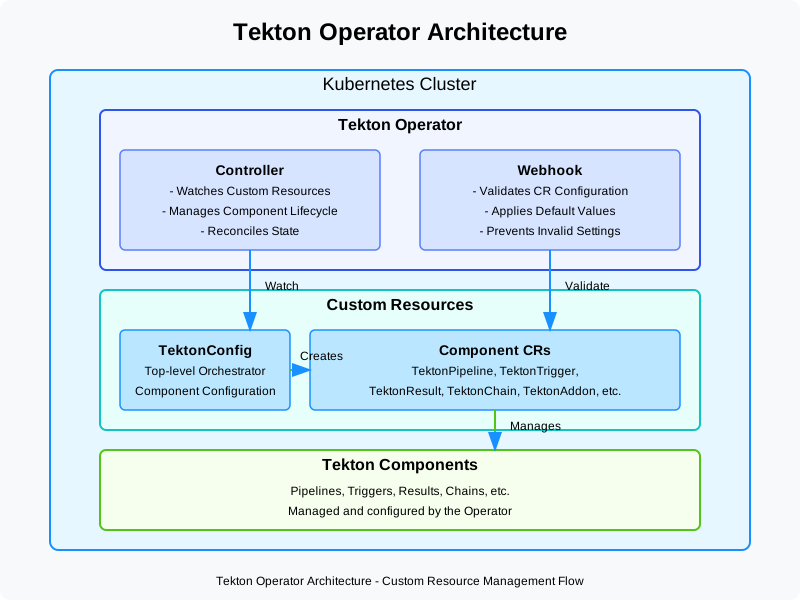
Tekton Operator Architecture Diagram

#Core Components

#1. Custom Resource Definitions (CRDs)

Tekton Operator defines several custom resources to manage different Tekton components:

  • TektonConfig: Top-level resource that orchestrates the installation of other components
  • TektonPipeline: Manages the Tekton Pipelines component
  • TektonTrigger: Manages the Tekton Triggers component
  • TektonResult: Manages the Tekton Results component
  • TektonChain: Manages the Tekton Chains component
  • OpenShiftPipelinesAsCode: Manages the Pipelines as Code component

#2. Controller

The operator controller watches for changes to these custom resources and reconciles the actual state with the desired state:

  • Detects changes in custom resources
  • Installs or upgrades corresponding Tekton components
  • Manages dependencies between components
  • Handles configuration changes
  • Performs health checks and error recovery

#3. Webhook

The webhook component provides validation and defaulting for the custom resources:

  • Validates custom resource configurations
  • Sets default values where necessary
  • Prevents invalid configurations

#Workflow

  1. Installation of Operator

    • Operator can be installed via Operator Hub, release files, or from source code
    • Creates necessary CRDs and RBAC permissions
  2. Resource Creation

    • User creates a TektonConfig resource (or individual component resources)
    • Defines the desired state and configuration
  3. Component Installation

    • Operator detects the custom resource
    • Installs the specified Tekton components
    • Configures them according to specifications
  4. Lifecycle Management

    • Manages updates and upgrades
    • Handles configuration changes
    • Recovers from failures

#Deployment Architecture

#Basic Components

  1. Operator Deployment

    • Contains the controller and webhook
    • Requires cluster-level permissions
    • Watches for custom resources
  2. Custom Resources

    • Define the desired state
    • Store configuration
    • Represent Tekton components

#Component Relationships

The TektonConfig resource orchestrates the creation of other resources:

  1. Dependency Management

    • Ensures components are installed in the correct order
    • Manages shared resources
    • Handles component interdependencies
  2. Configuration Propagation

    • Passes common settings to component-specific resources
    • Ensures consistency across components

#Security Architecture

  1. RBAC Permissions

    • Operator requires cluster-level permissions
    • Components use namespace-level permissions
    • Follows principle of least privilege
  2. Resource Isolation

    • Components can be installed in different namespaces
    • Supports multi-tenant deployments

#Extensibility Design

  1. Configuration Options
    • Extensive configuration options for each component
    • Support for custom settings and profiles

#References

  • Tekton Operator Documentation
  • Kubernetes Operator Pattern
  • Tekton Components