
Architecture
The following diagram shows the core HAMi runtime path for NVIDIA GPUs:
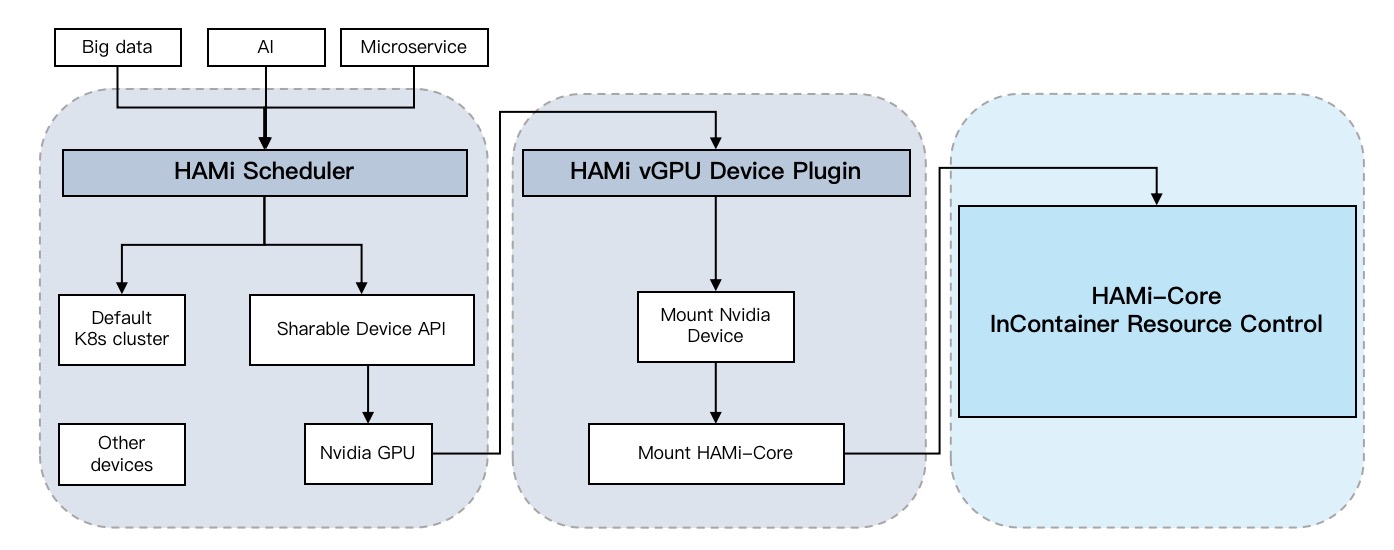
Alauda Build of HAMi contains the following core components:
- HAMi MutatingWebhook;
- HAMi scheduler extender;
- the built-in NVIDIA device plugin when
Enable NVIDIAis enabled; - HAMi-Core in-container resource control.
The HAMi MutatingWebhook checks whether a submitted Pod uses HAMi-managed resources. For a Pod handled by HAMi, it assigns the HAMi scheduler so that the workload enters the HAMi scheduling path.
The HAMi scheduler selects an eligible node and device for each HAMi workload. It maintains the device state needed to make scheduling decisions across the cluster.
The device-plugin layer is backend-specific. For NVIDIA GPUs, the built-in NVIDIA device plugin reports supported resources to Kubernetes, reads the scheduling result from Pod annotations, and maps the selected device into the container. For Ascend NPUs, Enable Ascend enables scheduler support but does not deploy an Ascend device plugin. The separately installed HAMi Ascend Device Plugin provides Ascend device exposure.
HAMi-Core enforces supported resource limits inside the container and reports the usage data provided by that runtime path.
Separately installed HAMi components
The product line can also include components that are installed and upgraded separately from the core cluster plugin:
Alauda Build of HAMi-WebUIprovides the optional HAMi resource WebUI and queries the platform Prometheus service.Alauda Build of HAMi Ascend Device Pluginis an Operator Bundle required to expose Ascend devices for HAMi-managed whole-card or vNPU allocation.
Vendor drivers, container runtimes, CDI configuration, DCGM-Exporter, and NPU Exporter are not HAMi components. Install and manage them through the NVIDIA GPU documentation or Ascend NPU documentation when the selected HAMi backend requires them.