
Create a Cluster on Alauda OS
On this path, creates workload clusters whose nodes run Alauda OS, an immutable operating system. Unlike clusters whose nodes run a non-Alauda OS, all node configurations are baked into images and remain unchanged after deployment. Cluster upgrades and configuration changes are applied by replacing nodes with new images, ensuring consistency, reliability, and simplified operations throughout the cluster lifecycle.
Clusters on this path are created and managed declaratively through Cluster API. An infrastructure provider for each supported IaaS platform creates the nodes from Alauda OS images. On Bare Metal, you supply the physical servers; they boot an installation ISO built by the provider and install Alauda OS.
This path follows these principles:
- Declarative Configuration: All infrastructure is defined as code
- Version Control: Infrastructure changes are tracked and versioned
- Reproducible Deployments: Consistent environments across different deployments
- Stage-Aware Recovery: Reproducible machine replacement for safe template recovery, with backup-based recovery when a Kubernetes minor upgrade has changed control-plane state
TOC
ArchitectureBootstrap Provider (Kubeadm)Control Plane Provider (Kubeadm)Infrastructure ProviderSupported ProvidersControl Plane EndpointWeb UI Support (Fleet Essentials)Install the Providers on the global ClusterCluster Creation WorkflowRelated TasksArchitecture
Cluster lifecycle management on Alauda OS is built on the Cluster API (CAPI) framework, which provides a declarative, Kubernetes-native approach:
- Declarative API: Kubernetes-native resources for cluster management
- Provider Interface: Standardized interfaces for different infrastructure providers
- Lifecycle Management: Automated cluster provisioning, scaling, and upgrades
- GitOps Integration: Native support for GitOps workflows
Three Cluster API providers work together, delivered as two packages: the Alauda Container Platform Cluster Bootstrap Provider handles Kubernetes bootstrap and control plane management, and an infrastructure provider manages the IaaS platform.
Bootstrap Provider (Kubeadm)
The Cluster API bootstrap provider for kubeadm handles the initialization and configuration of Kubernetes nodes:
- Node Initialization: Automates the process of turning bare machines into Kubernetes nodes
- Configuration Management: Manages kubelet configuration, certificates, and bootstrap tokens
- Join Process: Handles the process of joining worker nodes to the cluster
- Certificate Management: Automates certificate generation and rotation
Control Plane Provider (Kubeadm)
The Cluster API control plane provider for kubeadm manages the Kubernetes control plane:
- Control Plane Deployment: Deploys and manages the Kubernetes API server, etcd, and control plane components
- High Availability: Supports multi-node control plane deployments with load balancing
- Upgrade Management: Handles rolling upgrades of control plane components
- Health Monitoring: Monitors control plane health and performs recovery operations
Infrastructure Provider
The infrastructure provider for the target IaaS platform, such as Huawei DCS, manages the underlying infrastructure:
- Compute Provisioning: Creates and manages virtual machines or instances on the target platform
- Network Configuration: Sets up networking infrastructure
- Resource Management: Manages compute, storage, and network resources
- Provider Integration: Integrates with the provider's APIs and services
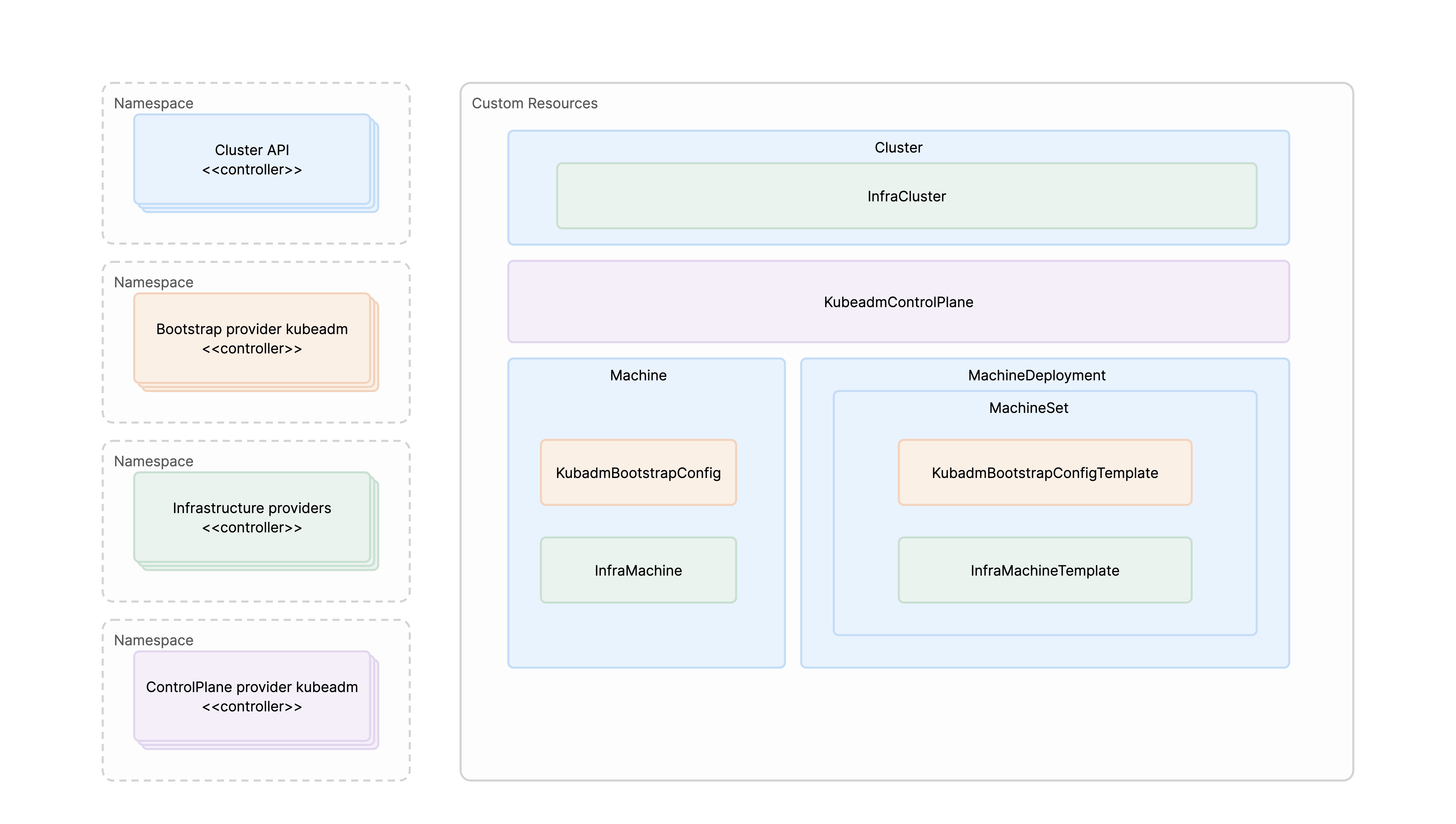
Supported Providers
Each infrastructure provider integrates with one IaaS platform to deliver cluster lifecycle management.
Control Plane Endpoint
Each cluster's Kubernetes API server (kube-apiserver, port 6443) is reached through a control plane endpoint — a virtual IP (VIP) or load balancer address that fronts the control plane nodes. How that endpoint is provided differs by provider, which determines what you must prepare before cluster creation.
Huawei Cloud Stack is the only VM provider that creates a platform load balancer object for you. An external load balancer — including its VIP allocation and backend (real-server) maintenance — is prepared and owned outside the cluster. On Bare Metal, Huawei DCS, and VMware vSphere, the provider can instead deploy an in-cluster VIP component (alive). For the requirements of each mode, see Plan the Control Plane Endpoint.
Web UI Support (Fleet Essentials)
Fleet Essentials is a cluster plugin that provides a shared web UI framework for cluster management. Infrastructure providers can extend it through UI extension anchors to add platform-specific pages and workflows.
When installed, Fleet Essentials enables:
- Unified Cluster Management: Single interface for managing clusters across all platforms
- Infrastructure Resource Management: Configure cloud credentials, IP pools, and machine templates
- Cluster Lifecycle Operations: Create, view, upgrade, and destroy clusters through guided workflows
- Node Pool Management: Declarative node pool management with scaling and upgrade capabilities
Providers that implement these Fleet Essentials extension anchors can add their own cluster creation workflows and management pages:
- Bare Metal Provider: Provides YAML-only cluster lifecycle management on physical servers. There is no Fleet Essentials UI for bare-metal clusters; every workflow is driven by
kubectl applyagainstBaremetalCluster,BaremetalMachineTemplate,MachineInventoryPool, and the upstream CAPI resources - DCS Provider: Adds DCS-specific UI pages and workflows on Huawei DCS. The
DCSIpHostnamePool.spec.pool[].persistentDiskconfiguration for pool-managed persistent disks is YAML-only - HCS Provider: Supports web UI-based cluster management on Huawei Cloud Stack when Fleet Essentials
1.0.2or later is installed, and YAML-based cluster lifecycle management, including pool-managed persistent disks throughHCSMachineConfigPool.spec.configs[].persistentDisks[] - vSphere Provider: Provides YAML-based cluster lifecycle management on VMware vSphere. There is no Fleet Essentials UI extension for vSphere cluster creation and management
Install the Providers on the global Cluster
After the global cluster is installed, and before you create a workload cluster on Bare Metal, Huawei DCS, Huawei Cloud Stack, or VMware vSphere, upload and install the infrastructure provider for that IaaS platform, together with the Cluster Bootstrap Provider, on the global cluster. This applies regardless of which IaaS platform the global cluster itself runs on.
To install a provider, download its package from the Customer Portal, where the providers are listed under Common ACP Extensions, upload it with violet push, and install it as a cluster plugin. See Install the Infrastructure Provider.
Upgrading Kubernetes on an Alauda OS global cluster also requires the provider for that IaaS platform to be uploaded and installed on the global cluster first.
Cluster Creation Workflow
Create a workload cluster on Alauda OS in the following order. Prepare describes the first three steps in the same order.
- Install the Provider: Install the provider for your IaaS platform, and the Cluster Bootstrap Provider, on the
globalcluster. - Infrastructure Resources: Configure the infrastructure resources that the provider requires, such as cloud credentials, IP pools, and machine templates. Bare Metal has no separate infrastructure resource page; its host preparation is part of the provider installation and cluster creation pages.
- Plan the Cluster: Read Prepare for the decisions that apply to every provider, such as the control plane endpoint mode and the image registry of the cluster. Also check the following before you create the cluster:
- Node Labels and Taints: If dedicated node pools (monitoring, logging, ingress) are planned, read how to declare role labels and taints on the pool in Infra Nodes before creating the pools.
- CPU Baseline: For x86_64 cluster nodes that use ACP-provided Alauda OS images, the underlying CPUs must support the
x86-64-v2ISA baseline. For details, see OS Support Matrix.
- Create a Cluster: Create the cluster, including its first worker nodes.
Each provider has its own pages for these steps:
If cluster creation or deletion stalls, see Troubleshooting.