
Architecture
TOC
Tekton Chains Architecture OverviewCore ComponentsTekton Chains ControllerSigning ComponentsStorage ComponentsData FlowSLSA Provenance GenerationDeployment ArchitectureHigh Availability ConsiderationsIntegration PointsTekton Chains Architecture Overview
Tekton Chains is a Kubernetes Custom Resource Definition (CRD) controller that enables supply chain security features for Tekton pipelines. The architecture of Tekton Chains consists of several key components working together to provide secure artifact signing and verification capabilities.
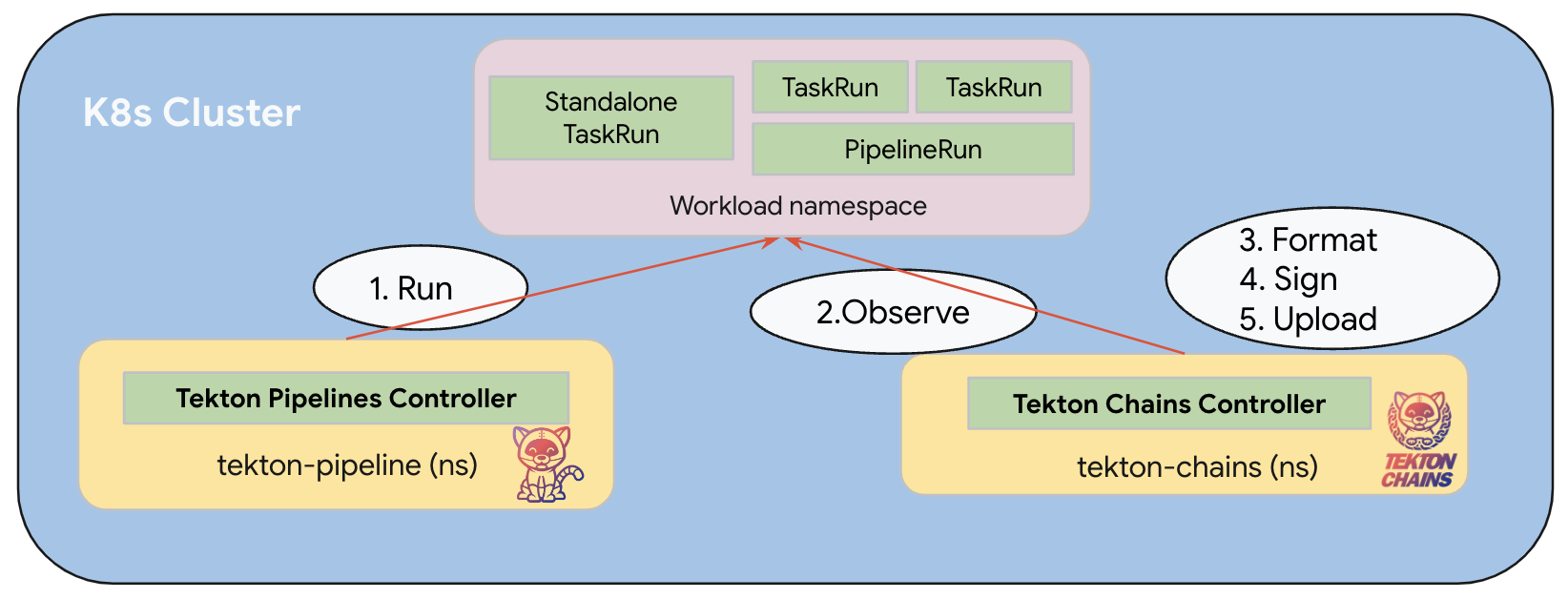
Note: The diagram above illustrates the high-level architecture of Tekton Chains. The actual implementation may vary based on configuration.
Core Components
Tekton Chains Controller
The Tekton Chains Controller is the central component of the architecture. It operates as a Kubernetes controller that:
- Watches for TaskRun and PipelineRun completions in the cluster
- Takes snapshots of completed TaskRuns and PipelineRuns
- Processes these snapshots to generate cryptographic signatures and attestations
- Stores the signatures and attestations in configured storage backends
The controller runs as a Kubernetes deployment in the tekton-pipelines namespace and is responsible for all the core functionality of Tekton Chains.
Signing Components
Tekton Chains supports multiple signing mechanisms to provide flexibility in how artifacts are secured:
- X509 Signer: Uses X509 certificates for signing artifacts
- Cosign Signer: Integrates with Cosign for container image signing
- KMS Signers: Supports various Key Management Systems:
- GCP KMS
- AWS KMS
- Azure KMS
- HashiCorp Vault
These signing components are responsible for cryptographically signing the artifacts and attestations generated by Tekton Chains.
Storage Components
Tekton Chains can store signatures and attestations in various backends:
- Tekton Storage: Stores signatures as annotations on the TaskRun or PipelineRun objects
- OCI Storage: Stores signatures and attestations alongside container images in OCI-compatible registries
- GCS Storage: Stores signatures and attestations in Google Cloud Storage buckets
- DocDB Storage: Stores signatures and attestations in document databases (e.g., MongoDB, Firestore)
- Grafeas Storage: Stores signatures and attestations in Grafeas servers
Data Flow
The data flow in Tekton Chains follows these steps:
-
Observation: The Chains Controller observes TaskRun and PipelineRun executions in the Kubernetes cluster.
-
Snapshot Creation: When a TaskRun or PipelineRun completes, the controller takes a snapshot of its state, including inputs, outputs, and execution details.
-
Format Conversion: The snapshot is converted into one or more standard payload formats (e.g., in-toto attestations, SLSA provenance).
-
Signing: The formatted payloads are signed using the configured signing mechanism (X509, Cosign, KMS).
-
Storage: The signed payloads are stored in the configured storage backends.
-
Verification: External tools can later retrieve and verify these signatures to ensure the integrity of the artifacts.
SLSA Provenance Generation
For SLSA (Supply-chain Levels for Software Artifacts) provenance, Tekton Chains:
- Extracts information about input artifacts (source code, dependencies) from TaskRun results
- Captures details about the build environment and process
- Records information about output artifacts (container images, binaries)
- Generates a standardized SLSA provenance document
- Signs the provenance document
- Stores the signed provenance alongside the artifacts or in a specified location
Deployment Architecture
Tekton Chains is deployed as a Kubernetes controller within a cluster:
- Namespace: The controller runs in the
tekton-chainsnamespace - Deployment: A single deployment manages the controller pods
- Service Account: The controller uses a dedicated service account with appropriate permissions
- Configuration: Configuration is managed through a ConfigMap called
chains-config - Secrets: Signing keys and credentials are stored as Kubernetes secrets
High Availability Considerations
The Tekton Chains controller can be scaled horizontally for high availability:
- Multiple replicas can be deployed for redundancy
- Leader election ensures only one instance processes events at a time
- State is maintained through Kubernetes resources, allowing seamless failover
Integration Points
Tekton Chains integrates with several external systems:
- Tekton Pipelines: Observes TaskRuns and PipelineRuns from Tekton Pipelines
- OCI Registries: Stores signatures and attestations alongside container images
- Key Management Systems: Integrates with various KMS providers for secure key management
- Transparency Logs: Can publish attestations to transparency logs like Rekor
- Verification Systems: Provides signatures that can be verified by systems like Kyverno, OPA, or Cosign
This architecture enables Tekton Chains to provide comprehensive supply chain security features while maintaining flexibility in deployment and configuration.